
We are happy to introduce you to your new BlueBird iT Support Portal. This new portal is part of a larger upgrade in our back end systems to more efficiently handle your support requests. We are launching the first phase of the portal so your team can start using it right away.
The portal currently allows you to:
- Submit new support tickets
- See the status of your support requests
- View documents that BlueBird iT has shared with your clinic or practice
In the new year we will gradually introduce several enhancements that will provide you with more visibility, more options, and more features in the portal.
How to access the portal
If you have received access credentials, you can access the portal at
https://support.bluebirdinc.com
How to set your password
If you do not have a password, please follow the instructions below.
- Go to https://support.bluebirdinc.com
- Select Forgoten Password?
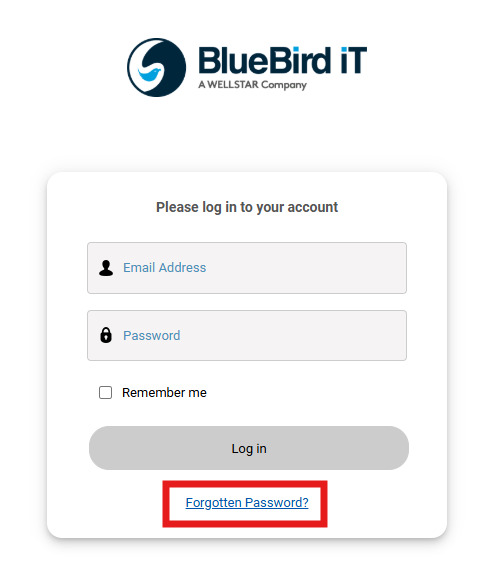
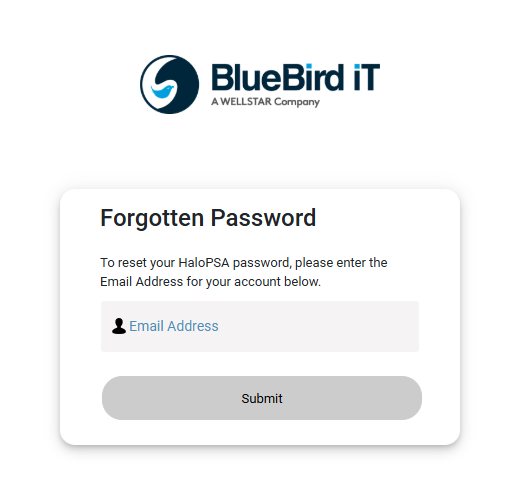
In the next window, enter your work email address you use to communicate with BlueBird iT.
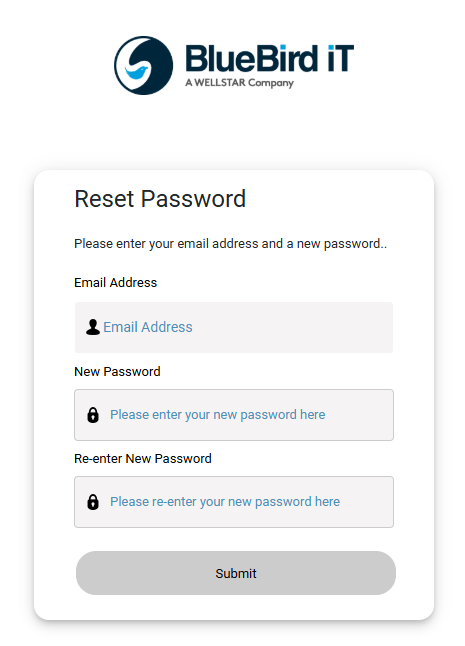
If your email address is already registered with BlueBird iT as a client contact for your clinic, you will receive an email with a temporary link to the Reset password page. Use that link to set your password.
If you do not receive an email, your address is not yet registered under your clinic. Please contact support@bluebirdinc.com
and request to be added to your account.
Each user must use a unique email address for portal access. Shared email addresses cannot be used.
If you have any questions about the portal or need help managing user access for your clinic, please contact support@bluebirdinc.com